Team Member Resources
  • New Employee Welcome
  • Leadership Development
    • Mentorship Program
  • Our Services
    • Personal Development Opportunities
      • Development Webinars
      • On-demand Learning
      • Insights Overview
    • Team Development Opportunities
      • Team Development Session Overview
      • Insights
      • Leader As Teacher: LAT
      • Team Discussion Guides
    • Executive Coaching
    • Consultation Services
  • Resources
    • Performance Management
    • Employee Engagement
    • Diversity, Equity & Inclusion
    • Change Support Resources
    • New Employee Resources
    • Understanding Implicit Bias
    • Team Discussion Guides
    • Talent Retention Toolkit
    • Development at Fairview
    • Leader Toolkit
    • Closed Loop
  • Commitments
Select Page

Managing a Team

⌘K
  • Using Lawson, the HR Management System
    • Overview
    • Processing Changes
  • MyHR/Manager Space
    • Accessing MyHR & Manager Space
    • Employee Change Processes
    • FAQs
  • E-Time
    • Responsibilities
    • Access E-Time
    • FAQs
    • Approving Individual Time Cards
    • Mass Approval of Time Cards
    • Setting Up Schedules
    • Historical Edits
  • MyTime
    • Pay Cycles
    • Time Card Approval
  • Employee Departures
    • Processing Employee Departures at Fairview
    • Processing Employee Departures at HealthEast
    • Exit Interviews
  • LMS / Required Learning
  • Talent Retention Toolkit
  1. Home
  2. Docs
  3. Managing a Team
  4. E-Time
  5. Access E-Time

Access E-Time


Access E-Time

  1. Click the Windows Start button on your computer.
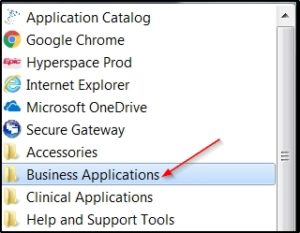
  2. Select Business Applications.
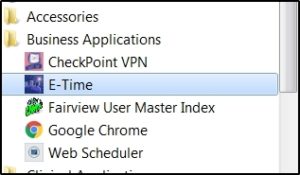
  3. Select E-Time.

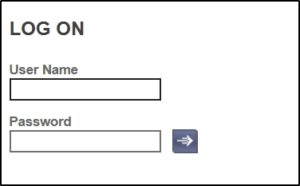
  4. On the log in screen, enter your username and password. Click the arrow to submit.

Doc navigation

← ResponsibilitiesFAQs →
Was this article helpful to you? No Yes