
Login
Access the iCIMS talent platform at this link and enter your standard network login name and password.
If above link does not work, here is the web address: https://fairview.icims.com
Fairview users: You can also access iCIMS from the Leadership Resources link on the Fairview intranet or your Business Applications folder
Dashboard
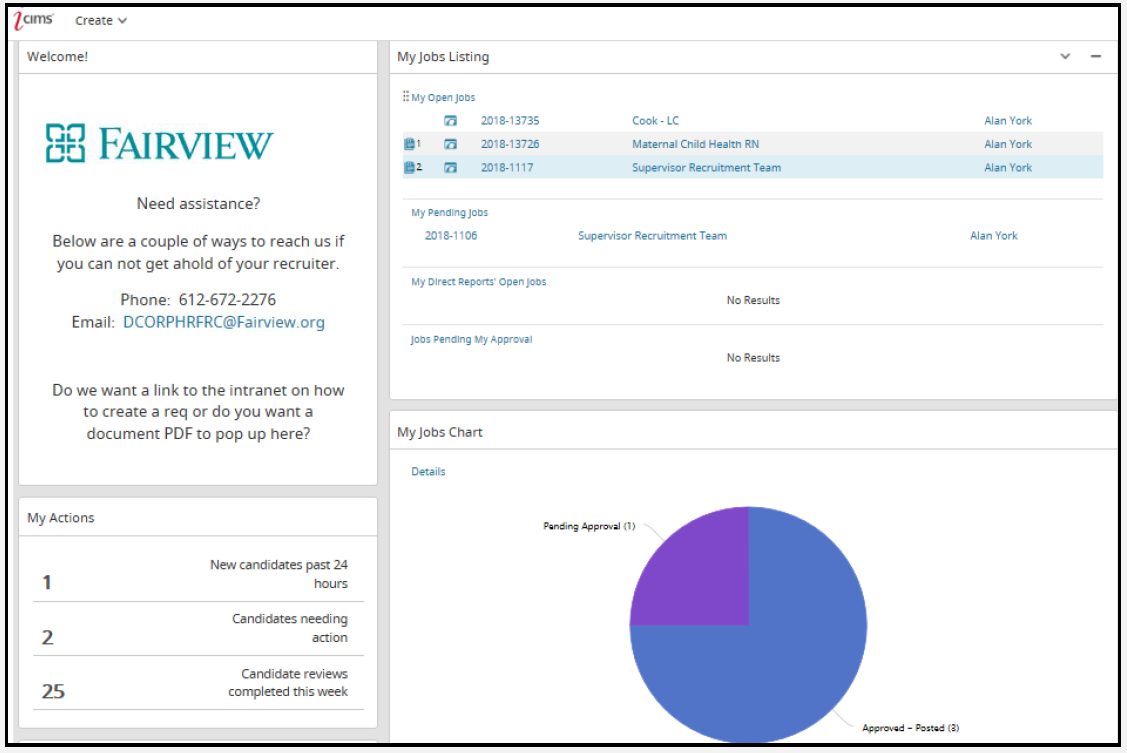
The Dashboard is the home page or welcome screen that users see after logging into the platform.
The dashboard displays panels for hiring managers to access and manage their requisitions and candidates in iCIMS.
Hiring managers using the iCIMS Talent Platform can review all appointments, jobs, and tasks to which they are given access from their Dashboard.
Functionality
Welcome Screen: Provides instructions on how to connect with Human Resources.
My Open Jobs: Displays all active open positions currently being recruited for.
Pending Jobs: Displays all jobs opened by hiring manager but waiting for approval.
My Direct Reports’ Open Jobs: Displays all active open positions assigned to your direct reports.
New Applicants by Requisition: Displays new applicants.
Create: Allows the creation of job requisitions.
Note: Hiring managers may log in to the iCIMS Talent Platform to manage candidates and jobs within the system. Many hiring manager processes may also be managed outside of the system (e.g., email approvals, accepting appointment invitations, etc.).